
Introduction
Predictive analytics is a branch of advanced analytics that leverages historical data, statistical algorithms, and machine learning techniques to forecast future outcomes. It enables businesses to transition from reactive to proactive strategies by anticipating trends, behaviors, and risks.
Microsoft Power BI, a leading business intelligence platform, now supports predictive analytics through built in features, integration with Python and R, and cloud based tools like Azure Machine Learning. As a result, Power BI has evolved beyond data visualization into a complete decision intelligence ecosystem.
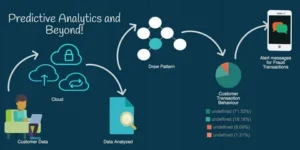
Establishing a Predictive Analytics Workflow in Power BI
Define the Business Objective
Effective predictive analytics begins with a well defined goal. Typical objectives include forecasting sales, identifying customers at risk of churn, estimating conversion rates, or predicting operational failures. Each objective must be aligned with a business KPI and categorized by problem type such as regression, classification, or clustering.
Prepare the Data
Power BI offers robust tools for data transformation through Power Query and advanced feature creation using DAX. Key tasks include:
- Removing duplicates and nulls.
- Normalizing values.
- Creating calculated columns such as average purchase interval, days since last interaction, or customer tenure.
Accurate, well structured data is essential for reliable predictive modeling.
Select the Modeling Approach.
Depending on the business use case, Power BI provides multiple modeling pathways:
- Built in forecasting tools support simple time series projections via the Analytics pane.
- DAX based logic can be used for rule based predictions such as scoring leads based on thresholds.
- R or Python integration enables custom machine learning models embedded directly within Power BI reports.
- Azure Machine Learning can serve models at scale and provide predictions through API endpoints integrated with Power BI.
The choice of approach should consider data volume, the complexity of the model, interpretability requirements, and available expertise.
Train, Validate, and Interpret Models.
- Models built using Python or R should be trained on historical data and tested on separate validation sets to avoid overfitting. Key evaluation metrics such as accuracy, precision, recall, or RMSE must be monitored to ensure the model performs reliably on unseen data.
- Interpretability is a crucial success factor. Visual explanations, confidence intervals, and clearly labeled predictions help stakeholders trust and act on the model outputs.
Operationalize and Visualize.
Predictions must be embedded into Power BI reports in ways that are meaningful and actionable. This may include:
- Forecasting sales trends in line charts.
- Flagging at risk customers in tables.
- Highlighting predicted KPIs across dashboards.
Reports should differentiate predicted values from historical data and allow users to interact with filters, slicers, and tooltips for greater clarity.

Use Cases Across Industries
Power BI predictive capabilities support a wide range of industry applications.
- Retail Demand forecasting and pricing optimization.
- Finance Credit scoring and fraud detection.
- Manufacturing Predictive maintenance and quality control.
- Healthcare Patient readmission risk and resource allocation.
- Human Resources Employee attrition modeling and talent analytics.
Each scenario involves unique data entities, features, and modeling methods but follows the same underlying process of preparation, modeling, and deployment.
Best Practices for Predictive Analytics in Power BI
To ensure success in predictive projects within Power BI, consider the following best practices:
- Maintain high data quality through rigorous preprocessing.
- Start with interpretable models before progressing to complex algorithms.
- Communicate uncertainty clearly through visuals and narratives.
- Monitor model performance and retrain regularly to handle data drift.
- Collaborate across teams to ensure business context is embedded in model design.
Adopting a structured and repeatable approach improves model accuracy, stakeholder trust, and long term scalability.
Embedding Predictive Intelligence into Business Strategy
- Power BI allows predictive analytics to be embedded within regular reporting environments. This democratizes advanced insights, enabling not just data scientists but also business users to explore forecasts, assess scenarios, and make decisions informed by data.
- By unifying semantic models, visual storytelling, and predictive outputs, Power BI serves as a platform for intelligent action rather than passive observation.
What is predictive analytics in Power BI?
Predictive analytics in Power BI refers to using historical data and algorithms to forecast future trends or outcomes within Power BI reports.
Can Power BI do forecasting without coding?
Yes. Power BI has built in forecasting features in line charts that allow simple time series predictions without writing code.
What tools can be used in Power BI for advanced predictions?
You can use R, Python, or connect with Azure Machine Learning for advanced statistical modeling and machine learning.
Is Power BI suitable for real time prediction?
Power BI supports near real time predictions if connected to streaming datasets or external APIs for live scoring.
What types of problems can be solved with predictive analytics in Power BI?
Typical problems include sales forecasting, churn prediction, demand planning, fraud detection, and risk analysis.
What is the role of DAX in predictive analytics?
DAX is used for creating calculated fields, time intelligence, and basic predictive logic based on business rules.
Do I need a premium license for predictive analytics in Power BI?
For built in features, no. But for AutoML and integration with Azure ML or AI visuals, a Power BI Pro or Premium license may be required.
What are the limitations of predictive analytics in Power BI?
Limited model training capabilities, dependency on external scripts for advanced modeling, and refresh constraints for R Python scripts.
Can I visualize predictions alongside historical data?
Yes. Power BI allows combining forecasted and historical values in the same visuals with clear labeling.
How often should predictive models be updated in Power BI?
Models should be retrained regularly, especially when new data is available or if data patterns change over time.
Conclusion
Predictive analytics in Power BI transforms raw data into actionable foresight. Whether through native tools or advanced model integration, Power BI empowers organizations to anticipate change, minimize risk, and unlock future value.
Organizations that embrace predictive thinking within Power BI gain a competitive edge by aligning technology with strategic objectives. As business environments become more dynamic, the ability to look ahead and act with confidence becomes a defining advantage.